Location, Location, Location
It's said that in real estate the most important thing is the location, and that's also true when thinking of screen real estate. How big something is and where it's located is tied closely to how useful it is.
The point is accentuated when it comes to the corners of the screen. These four precious areas are very easy to mouse to, making them very quick for oft used items. In the current Ubuntu default desktop we've chosen to give the upper right hand corner to bringing up the logout/power dialog. While this is a good use, I think we can do better.
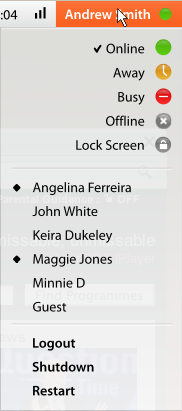
One of the problems with that solution is that we're using a whole corner for basically only one function. While it's an important function (turns out the center of the Earth isn't oil) it would be nice if we could put more functionality into that location.
The functionality that we're looking at putting into that corner is managing your IM status. Almost every user I see today is using some form of messaging client. If we look to optimize the interactions with instant messaging we're likely to see productivity gains for large numbers of users.
The other piece of functionality that we'd like to put on the same menu is fast user switching. This is a very handy function, but it is directly related to logging in and logging out. In many ways it is similar to "Pause session."
All in all, the better use we can make of our corners, the more efficient we make our users. If we have users that are 100 times more productive, even if we only have 5% of users, we can rule the world!
This update may or may not make users 100 times more productive, it hasn't been tested so it might, we just don't know. Remember, numbers never lie.
posted on Wed, 30 Jul 2008 at 19:10 | permanent link | 10 Comments
Hey, i like that idea!!
I 'd like to see it implemented and to use it, but i think a workaround must be found for the computers with quite a lot users... (ie. 40 users)
The way to make people more productive is to shut off IM altogether...
My top right corner has the calendar widget for GNOME. I need the calendar dozens of times per day, so it's nice to have it easily accessible.
The "power" widget? I use suspend once a day, but that's about it.
I agree... The first thing I do after a new install is remove the power off/suspend/hibernate applet. I have the Window Selector running in that corner and I use it all the time.
I just removed the button in favor of using the corner for Compiz-Fusion's expose-like tile-the-windows plugin.
Integrating that button with IM status is neat, but redundant if the function still shows up as a big button in Pidgin. Also, Pidgin instantly lets you type in (or ignore and let default) an away message, and it wouldn't be the same if you had to type the message in a popup.
The idea is nice, but it would requirea fix on another issue in Gnome: the fact that Gnome Panels get mixed up when resizing the screen, which can happen often when using multi screen setups, laptops, beamers, ... Mixed up to the point where often the widget in the upper right corner is moved to another position.
Great idea. Definitely agree with the points about gnome panel resizing needing work better for this to work well, and I'd also say that it would need to have a preferences setting to be able to not display the full name of the current user if preferred. That can be long, and take up a lot of real estate. Options could be no name at all, just first name, username rather than full name, or something custom.
Cheers, Tom
Ted,
This is a great idea, but it will require changes in default GNOME configuration. As mentioned above, corners of the screen are already pretty busy. So, since the proposed applet will substitute the old short one, you could move it to the left of time/weather/location applet.